
Manual Image Segmentation: Layering, Snapping and Splitting Compared
 Lisa UspenyevaUpdated
Manual image segmentation compared: Layering, Snapping and Splitting on the same livestock images, with when to use each, a comparison table and a summary.
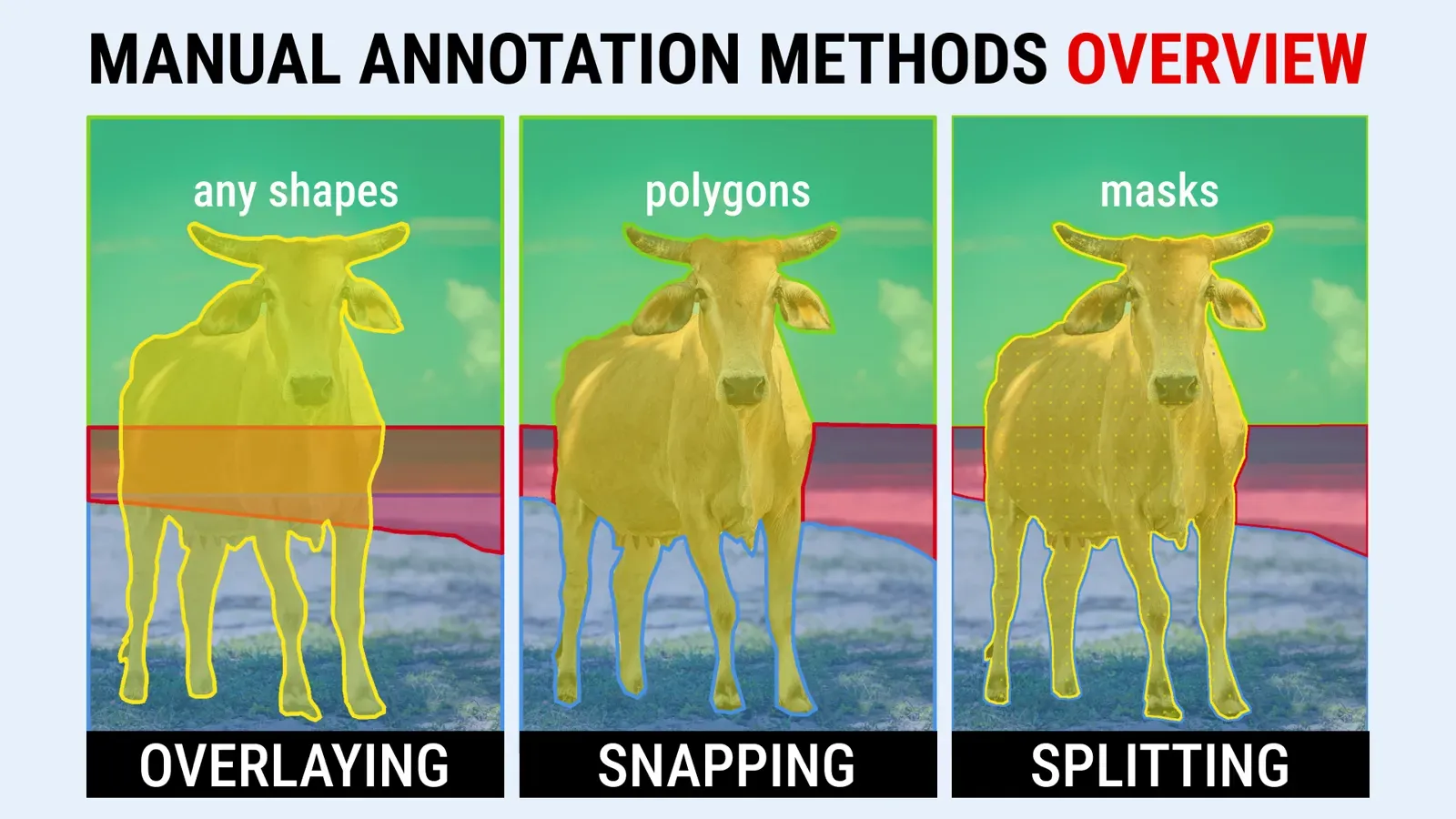
Manual image segmentation means labeling the pixels of each object by hand to build training data. Three main methods exist: Layering stacks objects by priority and allows overlap, Snapping makes neighbors touch without overlapping, and Splitting cuts one mask into parts. This guide compares all three on the same livestock images.
Complex images make this hard: crossing objects, distinct parts of a single object or many neighbors in one scene. Each method suits different needs, and all are used in industries such as medical, agriculture, manufacturing, energy, transportation, retail and construction. You can try them in the Supervisely image labeling toolbox. The docs describe the Polygon, Brush and Smart Tool tools.
What is the difference between instance and semantic segmentation?
In semantic segmentation every pixel gets a class, and objects of the same class are not told apart: all cows in a photo form one "cow" region. In instance segmentation each object gets its own mask, so every cow is a separate object. The methods below produce masks for either task. Which one you need depends on the model you train, and the method depends on how objects touch and overlap in your scenes.
What is the Layering method?
The Layering method, sometimes called object overlap or bottom-up order in the machine learning community and academia, annotates an image by stacking objects on top of each other in a set priority. Usually you start with the objects farthest from the camera and finish with the closest, which are layered on top of the previous ones.
It is a widely used technique in high-quality, dense pixel annotation projects such as the Cityscapes Dataset, where annotators manually drew polygons around roads, trees, cars, pedestrians and buildings. Every object is annotated in a fixed order, which gives a correct overlap and an accurate semantic or instance segmentation mask where each pixel is classified by object type.
Layering is arguably the quickest of the three methods, for two reasons:
- you can mix shapes such as polygons, masks and bounding boxes
- the lower layers can be less precise, because the layers above them refine and neaten the overlaps. The masks are clean after the annotations are rasterized.
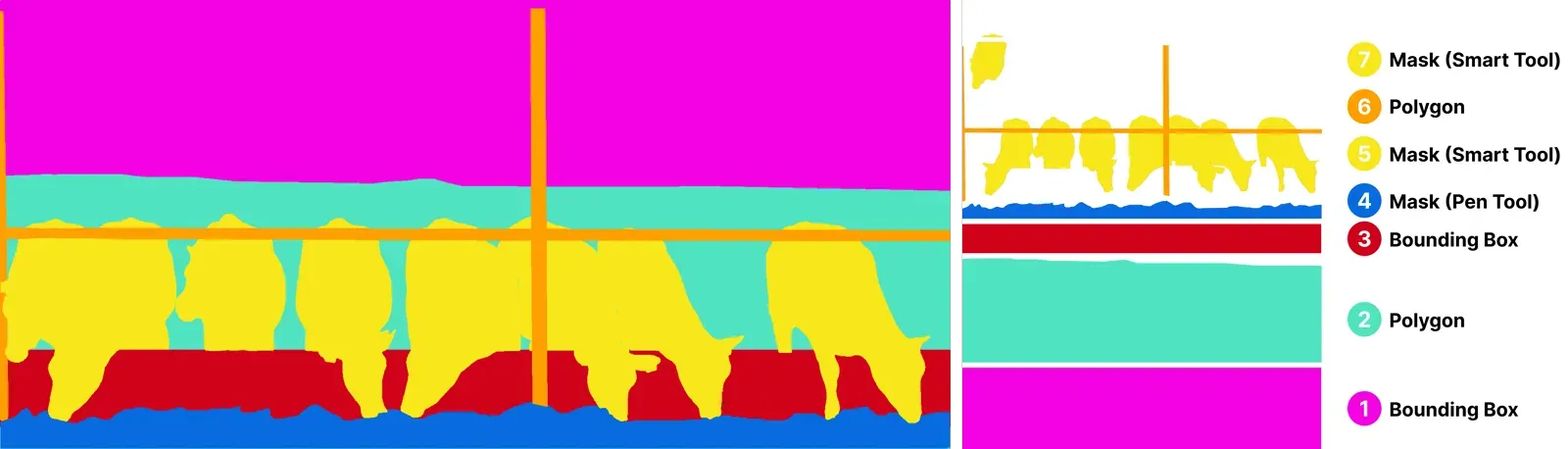 Use of different object shapes with Layering technique for manual annotation of cows
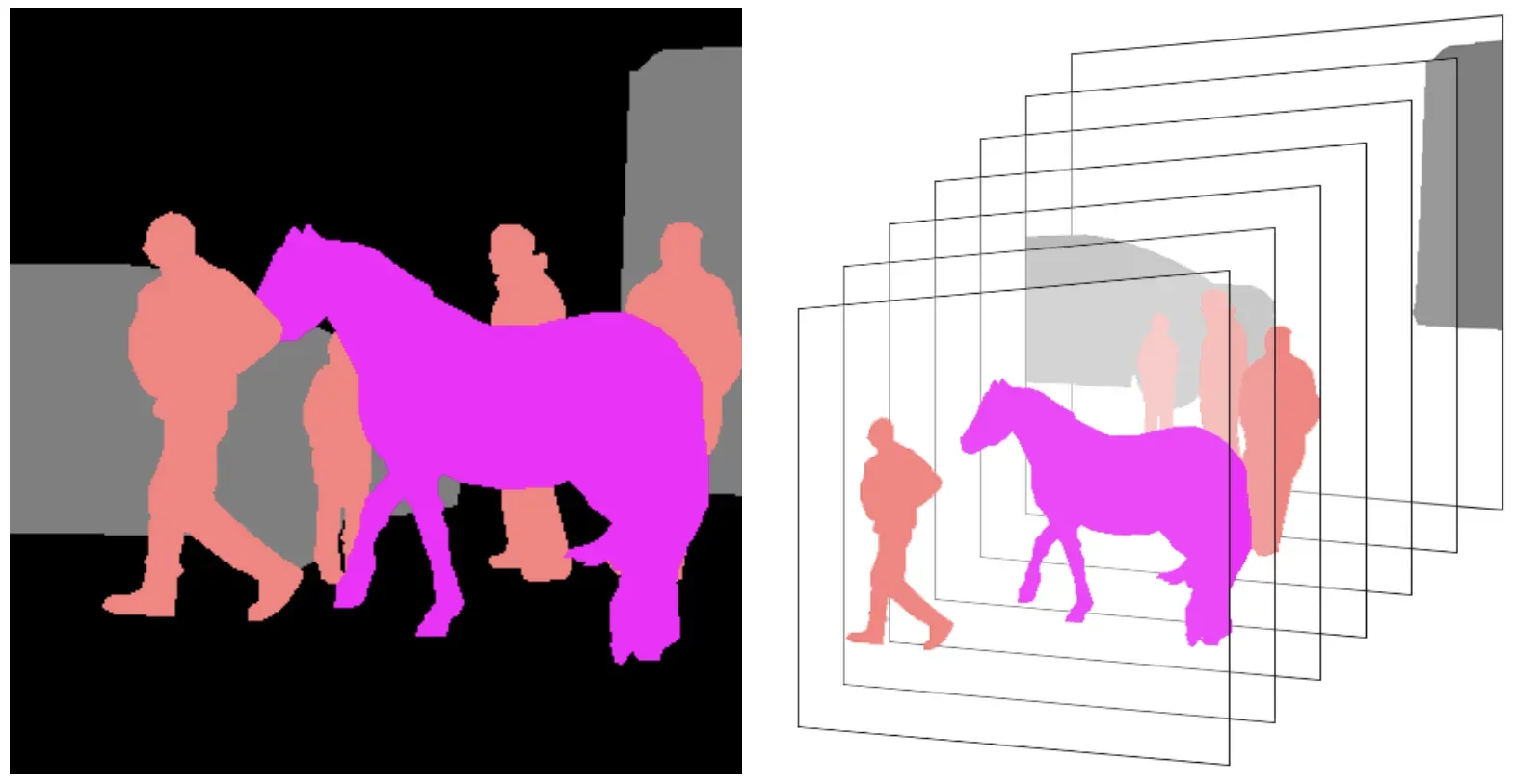 Priority of layers from farthest to nearest
When to use Layering?
- Complex scenes. Streets with vehicles, pedestrians, signage and buildings, and agricultural and manufacturing scenes, where objects overlap or sit close together.
- Semantic segmentation. It gives precise pixel-level classification.
- Large datasets. Mixed shapes and layers speed up annotation while keeping quality.
- Hidden objects. Partially obscured objects are still labeled correctly.
- Changing requirements. Shapes are easy to edit, so it works when new classes are added to the guidelines or labeling rules for an object change and existing annotation has to be corrected.
- Iterative refinement. Rough annotations on lower layers are refined by later layers.
Layering annotation requires postprocessing to finalize the annotations. For effective neural network training, use all classes of data in their entirety, without excluding any annotations from training. If you need to exclude overlapping data, use a post-processing app that removes the overlaps automatically.

Rasterize objects on images
Convert classes to bitmap and rasterize objects without intersections
What is the Snapping method?
The Snapping method, also known as Snap To Boundaries, is a less widely used approach. Objects must touch each other but must not overlap, so the annotator has to connect the boundaries of every object precisely. To ease this, Supervisely added a feature that automatically connects adjacent points and lets you reuse existing points for the object contour.
Snapping struggles with intricate scenes. Editing one object often means adjusting all of its neighbors. When an object is removed or its boundary changes, the gap must be filled using the existing objects, so every neighbor has to be modified too. This is slow and makes the annotation inefficient. Snapping still works well for simple tasks, such as scenes with a few zones and objects or the components of one object.
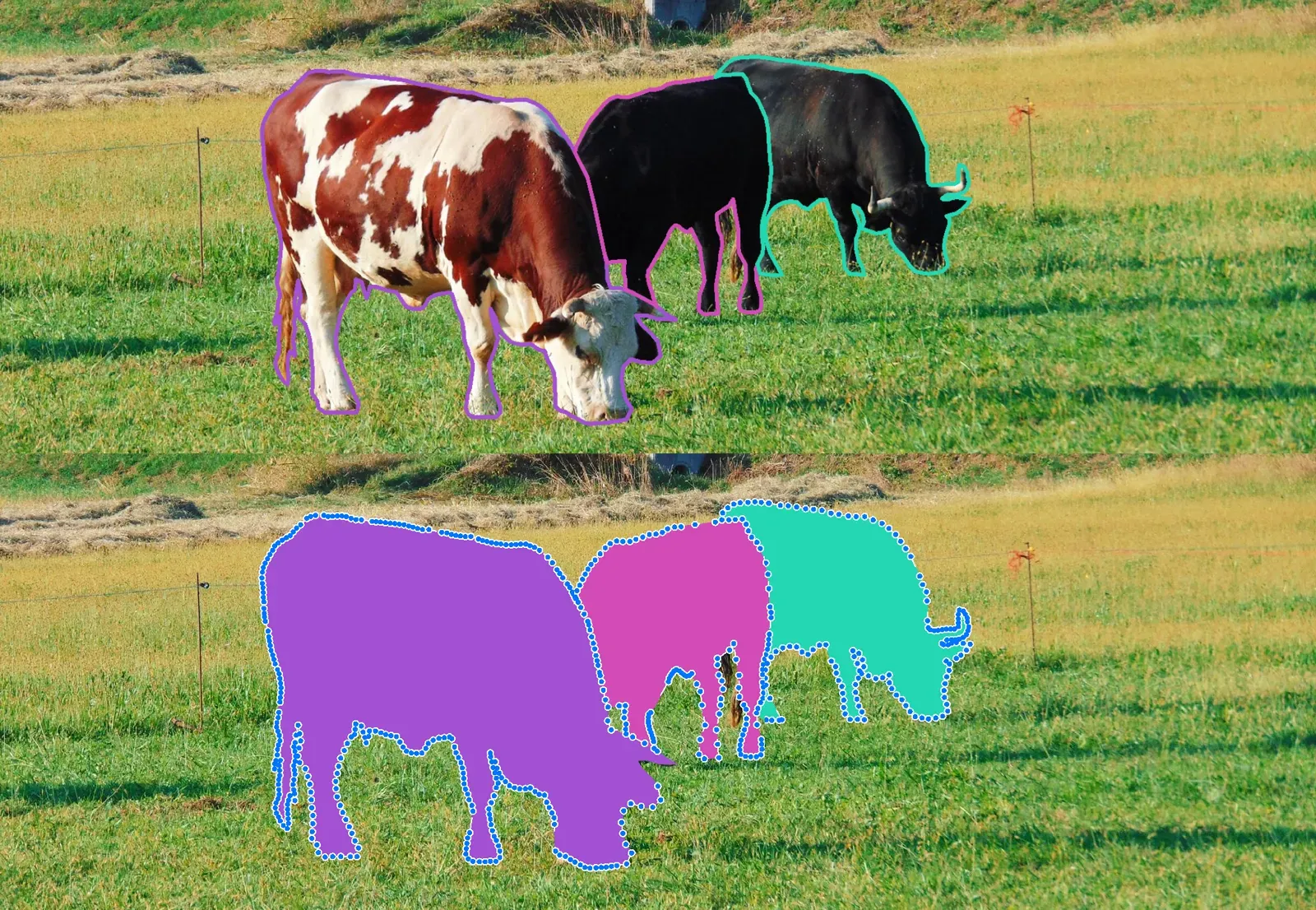 Masks of cows created using the Snapping annotation technique
When to use Snapping?
- Simple scenes with few objects. Connecting adjacent points is efficient when only a few neighbors or zones need labels.
- Precise boundaries. Objects touch but do not overlap, so they are clearly separated. Other methods can do this too.
- Teaching. The approach is straightforward, so it suits learning the basics of image annotation.
Disadvantages: it is not suitable for scenes with many overlapping objects or where a change to one object forces many changes to others. Labeling also gets much harder if the requirements change, for example when the list of classes is adjusted or labeled objects need editing.
What is the Splitting method?
The Splitting method, also called Split Mask, simplifies complex objects and scenes by cutting a mask into smaller pieces. It works only with masks, which matches neural network outputs that also use masks. The result is a set of unified masks you can edit with the brush, pen and eraser, or with a polygon to fine-tune boundaries or cut holes. It is particularly good at splitting objects into their components. You don't need to track the labeling sequence, and there is no post-processing. One tool labels both simple and difficult shapes.
The ADE20K dataset is a good example. It collects images from diverse environments, and annotators break each object into its parts. A car, for instance, gets separate labels for wheels, windows and doors. This granular annotation lets models learn whole objects and their components.
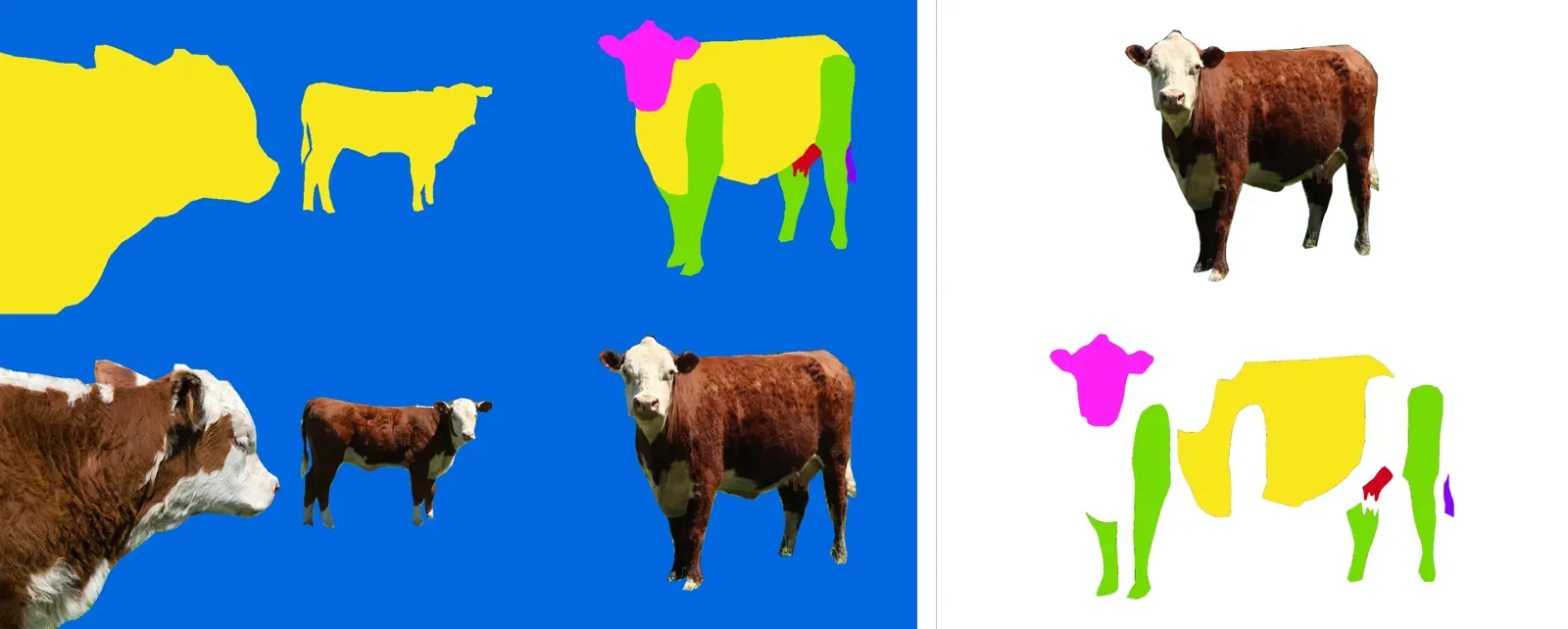 Masks of parts of cows created using the Splitting annotation technique
When to use Splitting?
- Detailed scenes. Breaking a complex image into smaller segments makes it easier to focus on each element.
- Objects with holes. The outer boundary and the internal voids are annotated separately, so models can recognize both.
- Deep learning models. The result is a set of non-overlapping masks, so the training data needs no additional postprocessing, and models learn to tell the parts of an object apart.
- Overlapping or close objects. Each object is distinguished without confusion.
Disadvantage: it can only be used with the mask shape.
Layering vs Snapping vs Splitting: which method to choose?
| Feature | Layering | Snapping | Splitting |
|---|---|---|---|
| Shape | Any shape | Polygons | Masks |
| Creating | The bottom layers may not be labeled accurately | Maximum precision labeling | May be inaccurate at intersections with other objects |
| Editing or deleting an object | Easy | Requires adjustment of other objects | Creates gaps that need fill-ins |
| Combining different shapes | Seamless, for example polygons and masks | Careful integration required, especially for mask to polygon conversion | Not possible |
| Prelabeling | Neural networks, ensemble of neural networks, Smart Tool | - | Neural networks, Smart Tool |
| Benchmark prevalence | Cityscapes | Not commonly used | Not commonly used |
| Labeling organization | Allows specialized annotation teams | Requires versatile annotators across multiple object classes | Puts more workload on one person, with more chance of mistakes |
Can neural networks prelabel segmentation?
Yes. Moving from manual methods to prediction models is often the next step. Models segment images at the pixel level and go beyond manual methods in speed and scale. The sections below cover the Smart Tool, single neural networks and ensembles.
All segmentation models produce predictions as masks. That is why the Supervisely Image Annotation tool supports annotation with masks (brush tool), polygons and a combination of both (pen tool). When manual annotation is combined with interactive ML-assisted annotation and model prelabeling, you need to combine different tools on a single image.
Also work directly with masks instead of converting them to polygons, because the conversion lowers quality on object boundaries due to contour approximation. We recommend the "layering" approach in such scenarios. It lets you combine polygons and masks and use the polygon, brush and pen tools together.
How does the Smart Tool help?
Smart Tool uses AI to identify and segment objects within an image. It gives access to many segmentation models integrated in Supervisely, including Segment Anything, Segment Anything HQ, RITM and others. With Layering, Smart Tool can recognize even objects overlapped by other annotations. This prelabeling provides an initial layering that annotators refine as needed.

RITM interactive segmentation SmartTool
State-of-the art object segmentation model in Labeling Interface

What can a single neural network model do?
Segmentation networks such as U-Net or any model from the MMSegmentation toolbox predict a mask for every class, assigning each pixel to one class. The output resembles the Splitting method: a set of non-overlapping masks.


Train MMSegmentation
Dashboard to configure, start and monitor training
Limitation: predictions are exclusive, so a pixel can belong to only one class. A single model cannot handle overlap or hierarchical relations between classes, such as a road with potholes on it.
Why use an ensemble of neural networks?
Often you have several custom models for different sets of classes instead of one model that segments everything. In some industrial use cases an ensemble of separate models is more useful. There are a few reasons:
-
You have separate training datasets for different subsets of classes.
-
You do not need real-time processing.
-
You want to improve models separately.
-
Your labeling requirements change over time (classes are added or removed) and you do not want to retrain your models.
An ensemble or multi-stage pipeline introduces a form of Layering: different models specialize in different layers of an image. This helps with overlapping objects and closely related classes, like a car and its defects.
Take a road surface and its defects, such as potholes or cracks. If a model is trained only on the road, a pothole counts as part of the road. A second model must segment potholes on top of the road, which is exactly what Layering covers. You can combine ensemble predictions with manual annotation to segment complex, dense scenes.
The same goes for cars, their parts and defects. You annotate the entire car and the defects on top of it (layering), then train the defect model on a subsample of classes and a separate car model on car masks without holes. Layering is the most efficient annotation approach here too. After inference, post-processing merges the output masks into one coherent result.
How to choose a segmentation method?
This post compared three methods of manual image segmentation: Layering, Snapping (Snap to Object Boundaries) and Splitting (Split Mask).
- Layering suits scenes with multiple overlapping objects, thanks to layers prioritized on top of each other.
- Snapping suits tasks where elements must connect clearly without overlapping.
- Splitting cuts out different parts of an object and makes new objects from them.
If accuracy and flexibility with overlapping objects matter, choose Layering. For clear separation without overlap, choose Snapping or Splitting. If you need object detail, Splitting is the best. You can also combine the methods. A wrong choice leads to longer annotation time or lower data quality, so understand your task first.
Frequently asked questions
What are the main methods of manual image segmentation?
Three methods are compared in this guide. Layering stacks annotations by priority so they overlap. Snapping makes neighboring objects touch without overlapping. Splitting cuts a mask into smaller pieces.
What is the difference between instance and semantic segmentation?
Semantic segmentation assigns a class to every pixel and does not separate objects of the same class. Instance segmentation gives each object its own mask, so two cows are two objects.
When should I use the Layering method?
Use it for complex scenes where objects overlap or sit close together, such as city streets, and when you need detailed pixel-level masks. The post calls it arguably the quickest method, because the lower layers can be less precise.
When is Snapping a good choice?
Snapping works best in simple scenes with a few neighboring objects or zones, where object boundaries must touch but not overlap. It gets slow in complex scenes, because editing one object often means editing its neighbors.
What shape does the Splitting method work with?
Splitting works only with masks. It is a good fit for objects with holes and for breaking an object into parts, such as the wheels, windows and doors of a car.
Can I combine the segmentation methods?
Yes. The post notes that the methods can be combined to get the best result. Choose by your annotation needs: Layering for overlap, Snapping for clear separation, Splitting for detail.